Streaming media from the internet is fast becoming a primary method of watching TV and films - and with quality shows like House of Cards and Outlander, people want to enjoy these on the largest screen in their house.
A lot of new smart televisions have streaming apps built in, but if your TV doesn't have this option, there are plenty of devices which aim to help.
What to Read Next
Digital Spy has collected the best in this streaming device shootout, which pits Apple, Amazon, Google and Roku against each other to decide which should earn pride of place in your living room.


We'll start by dividing the devices into two groups - first we have the larger, more powerful streaming boxes, and secondly we'll take a look at small, inexpensive streaming sticks.
Part 1: Streaming boxes
Design
If your streaming device is going to be on display in your living room, the way it looks is quite important. Judging this is difficult however, mainly because they're all black boxes (apart from Now TV, which is a white box).
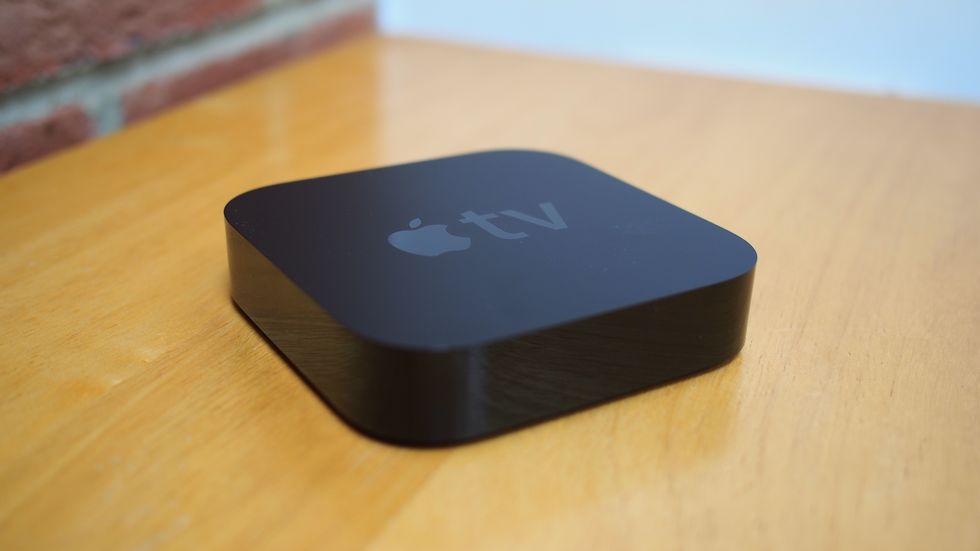
The Amazon Fire TV and Apple TV are both square, with glossy black sides, a matte black top and feature their respective logos. While the Amazon Fire TV is thinner than the Apple TV, it also takes up more space with a larger footprint.
The Amazon Fire TV and Apple TV both feel and look like premium devices, while the Roku looks cheaper with a more glossy, plastic finish.

The Now TV is white, so it looks out of place among the black set-top boxes, games consoles and Blu-Ray players.
None of the others would look out of place in a typical home entertainment set-up, but we'd give the 'best black box award' to the Amazon Fire TV, with its low-profile case, matte finish and precision edges. The Apple TV comes in a very close second.
Winner: Amazon Fire TV
Hardware
We have a wide range of specs here, from the basic Now TV box to the fully featured Amazon Fire TV.
The Now TV box has the least powerful hardware (although that's no surprise given the price). Navigating the menu can be sluggish but it's by no means unbearable. It has HDMI and A/V out ports, but that's it. The biggest downside to this device is that it only streams in 720p, so shows like Game of Thrones aren't the best quality available, and that's a shame.
Next up is the Apple TV. With 512MB, a single-core A5 chip and 8GB of internal storage this device on paper seems underpowered. However, as with most Apple devices, this doesn't translate to real life, and navigating the menus is responsive. The Apple TV features an HDMI, optical audio out and ethernet cable.
The Roku is powered by a snappy dual-core processor, and the menu system is fast and responsive. Ports include standard HDMI and ethernet, but also USB, MicroSD and a headphone jack on the remote. Unfortunately the microSD slot isn't for storage or playback of media, instead used to store channel and game information.


If you're after the fastest and most powerful streaming device, then look no further than the Amazon Fire TV, which comes packing a quad-core processor and 2GB RAM. The menu is incredibly quick to navigate and ports include HDMI, optical audio, ethernet and USB.
Winner: Amazon Fire TV
User Interface
The user interface of the Roku is simple and fast, there are no animations, and everything is geared towards getting you to your content as fast as possible. It works well, but it isn't the sexiest UI out there.
In an update that's coming soon, Roku will also get universal search, which saves users from needing to search for a film or TV show in each app separately.
Roku also offers some customisation options as well, with different colours available for the menu system. So if you don't like purple, that's not a problem.
Amazon takes a different approach. Its UI much more sleek, with more animation. Accessing frequently used apps is quick, and content from Prime Instant Video is well presented with useful recommendations.
The Advanced Streaming And Prediction (ASAP) function on Amazon is particularly useful. By predicting what you'll watch, it pre-loads streams to reduce video buffering. This feature blew us away, the buffer-less future is finally here.
Apple TV is simple and intuitive, similar to the Roku. Accessing apps is quick, and if your laptop is connected to the same Wi-Fi network, it allows you to browse and stream content from your iTunes library.
The user interface of the Sky Now TV box is the same as the Roku, without the customisation options. It's fairly basic, but intuitive and gets the job done.
Unfortunately (but understandably) the Fire TV's UI gives priority to Instant Video content, where as our favourite Roku is more unbiased, with its powerful search and simple interface. However, if you are an Instant Video subscriber, Amazon is an equally deserving winner.
Winner: Roku 3
Control
All of these devices can be controlled from a smartphone app - however, the infrared remote is the primary way you'll be navigating the menus.
The good news is that the small remotes that come with all of these boxes are pretty good.


Apple's remote is the most premium but also the most basic, made from aluminium and with only simple navigation controls. It's also the smallest, and we lost ours down the sofa (more than once).
The Now TV and the Roku remote are made from cheap plastic, but are actually surprisingly solid. The Roku remote is much more advanced, with Wii-style motion controls which work well, allowing users to play games and select apps.
The Roku remote also features a headphone port, removing the need to plug headphones into the television. This is a really useful option.
The Fire TV remote is made from softer, more premium plastic. It's a more basic remote than the Roku, but it features voice search (which works surprisingly well) for bringing up apps and content on the television.
Winner: Roku 3
Apps
Amazon Fire's platform is based on Android, which means developing games and apps for the device is easy. It has a good range of streaming services, including BBC iPlayer, YouTube, ITV Player, Plex and Netflix. Unfortunately it is missing a few major players: Sky/Now TV, ITV and Demand 5.
Thanks to the device's high-powered internal specs, the box can also play graphic-intensive games such as The Wolf Among Us and Minecraft. It's a really nice addition, especially when paired with a bluetooth games controller. The games run well without many problems, although it won't be challenging your Xbox One or PS4 anytime soon.
Only a select group of apps approved by Apple are available on the Apple TV. This includes Netflix, YouTube, Vimeo and Now TV, as well as a few more niche services like Hopster and CBS Sports. This is slightly limiting, but if you have an iPhone, video from that can be streamed to the device, including BBC iPlayer and similar catch-up services.


Similar to the Apple TV, Sky is strict when it comes to app selection - despite being based on Roku's software. It does have all of the UK catch-up services, but it's missing Netflix and Prime Instant Video.
The Roku is the only device to include all UK catch up services and Netflix (but no Amazon Instant Video) - that's why this is our favourite when it comes to apps. It's not perfect though, as it doesn't include the wide range of free apps found on Amazon Fire TV.
Winner: Roku 3
Cost
At £59 the Apple TV is very reasonable. That said, there's no competition in this category - the Now TV box only costs £19.99 (and that price includes a two or three-month movie/entertainment package).


This low price is reflected in the other categories, but if it's the cheapest streaming device you're after, then look no further than the Sky-owned firm's box.
The others come in at £79 for the Amazon Fire TV, and an expensive £99 for the Roku 3.
Winner: Now TV Box
Verdict
The competition between the Amazon, Apple TV and Roku is very tight. If you're fully invested in the Apple ecosystem it works seamlessly with iPhones, iPads and Macs making it a very capable device, despite not winning a single category in the shootout.
If you're not a iOS user then the choice between Roku and Amazon Fire TV is far more difficult - they're both very good streaming boxes.
The Amazon Fire TV is quick and runs an excellent selection of apps and games. It's unfortunate that some major UK streaming services are missing. It's the best possible way to watch content from Prime Instant Video - so if you're a member, the Fire TV may be the way to go.
The Roku 3 does feature all of the major UK streaming services, including BBC iPlayer, ITV, All4, Demand 5, Now TV and Netflix. If you're not bothered about the slickest user interface or premium design and are just interested in content, then this is the device for you.
Winner: Roku 3
Part 2: Streaming sticks
Next up we've got streaming sticks. They're smaller and generally less powerful, but if you plan on travelling, they could be the perfect companion.
Design
Google Chromecast and Amazon Fire TV Stick are both black, while the Roku is purple.


However, how a streaming stick looks is pretty irrelevant - because they're going to be plugged directly in your HDMI port, hidden away behind your television.
Winner: N/A
Hardware
Chromecast and Roku are the lower-powered streaming sticks, both with only 512MB of RAM. Chromecast has 2GB of storage, and the Roku has a dual-band antenna. This is reflected by the Roku when navigating the menu system, which can be slow at times.


The Amazon Fire TV is the most powerful, with 1GB RAM, a dual-core processor and dual-band antenna. It's fast when opening and switching between apps. So if it's the most powerful you're after, then the Fire TV Stick is the way to go.
Winner: Amazon Fire TV Stick
User Interface
The user interface of the Amazon Fire TV and Roku are identical to their bigger brothers - although navigating the menus lags more due to the lower-powered hardware.
Google Chromecast doesn't have a menu system - instead media playback is started from a user's smartphone, tablet or Chrome browser. This makes the device extremely simple to use, but ultimately, less useful than the other two.
The Roku Stick is hampered slightly by lower internal specs, making the Fire TV Stick's menu system more of a pleasure to use.
The Amazon Fire TV Stick also has the excellent ASAP function, and the ability to log onto Wi-Fi networks which have a 'captive portal'. These are webpages which require users to enter a password (often used in hotels and on university campuses). This makes the device really useful to students, or people who frequently travel and would like to stream content to the television screen in their hotel room.
Winner: Amazon Fire TV Stick
Apps
The Amazon Stick can run most of the same apps as the larger Fire TV, with the exception of more graphic-intensive games. Although unfortunately it's still missing All4, Now TV and ITV Player.
The Roku streaming stick has the ability to run all of the Roku 3's streaming apps, but loses the ability to play games as well.


The Google Chromecast doesn't have any apps installed on the device. Instead, apps from your phone are used to stream media to your TV screen. This is good because a lot of apps can make use of the function, but call us old fashioned - we still prefer browsing through apps with a remote control.
Winner: Amazon Fire TV Stick
Control
This one is between the Amazon and Roku, as the Chromecast doesn't come with a remote. Both are plastic-fantastic and nothing to shout home about.


In addition to their infrared remotes, all of these can be controlled with a mobile app. They're all well designed and we couldn't find any problems with them.
Winner: Roku Stick / Amazon Fire TV Stick
Cost
All of these devices are very wallet friendly, the Amazon Fire TV stick comes in at £35, the Roku is £49.99, and the Chromecast is the cheapest at £30.
If you want the cheapest then go for Chromecast, but clearly, if you want value for money, then the Amazon Fire TV Stick should be your choice.
Winner: Amazon Fire TV Stick
Verdict
There is no competition in the streaming stick category. The Amazon Fire TV Stick is a clear winner. The Chromecast was the first device of its kind, but it's since been overtaken by more competent rivals.
Winner: Amazon Fire TV